What are accounts?
Accounts provide a way to track the affect of different variances on employee working time for monitoring and 'decision making' purposes:
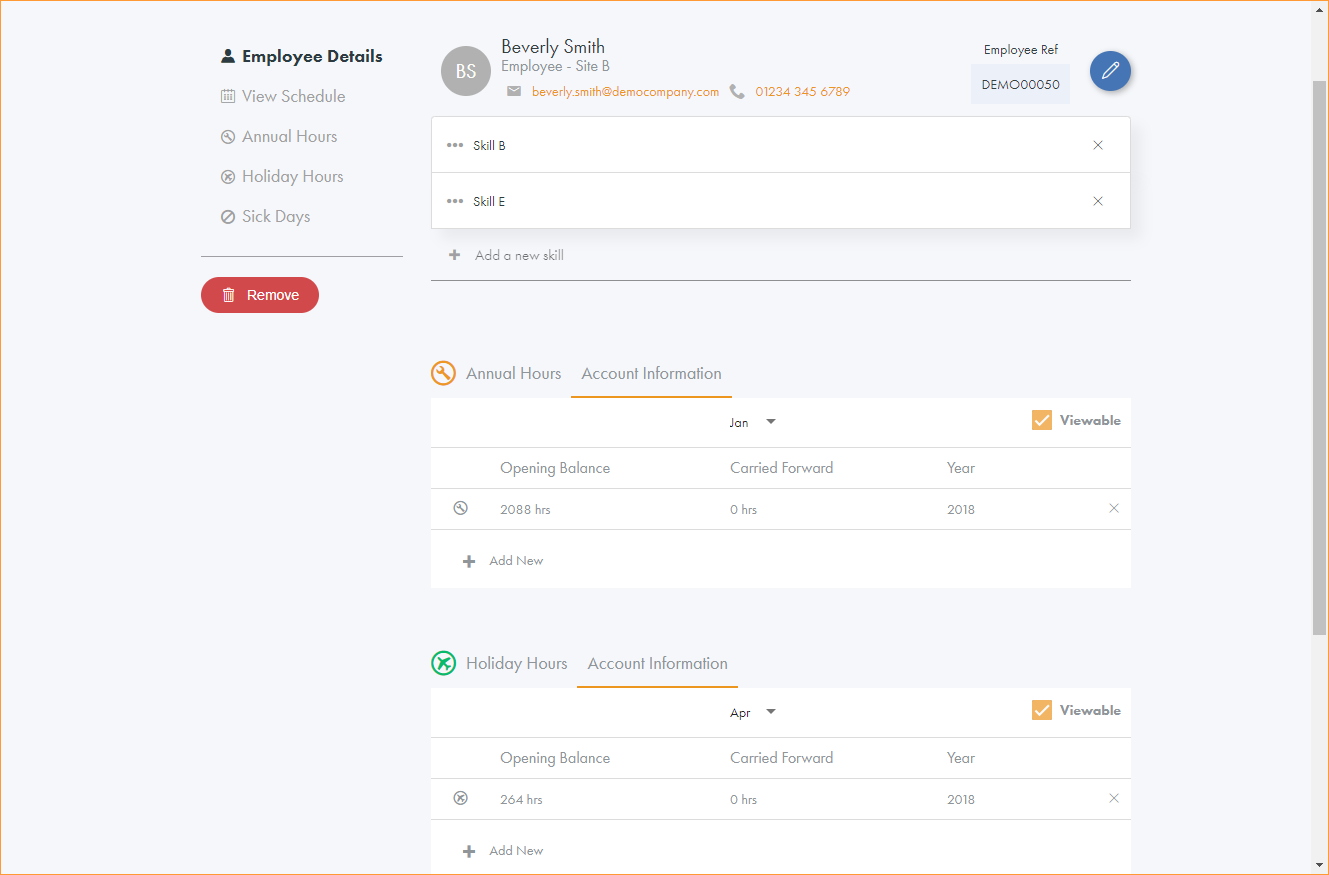
The accounts shown in this online help include Annual Hours, Holiday Hours and Sick Days. Accounts could also include overtime worked or number of shift swaps. There can be any number of accounts set up for different purposes and they can be measured in either hours or days.
The information configured in accounts is used to display accurate account summary data. Account summary data can include the number of hours that an employee has worked compared to the number of hours that they are contracted to work. Variances, such as paid annual leave, are applied to accounts within employee records to ensure accurate account summary data. Account configurations are set to determine the behaviour of the accounts calculations and the Accounts Alert dashboard indicator.
Note:
- Which variance reasons are applied to each account is configurable to suit your requirements.
- A variance reason can affect an account positively (add days or hours onto an account), negatively (reduce the number of days or hours on an account) or by a factor other than one. For example, for overtime which is recorded at time and a half, this variance might be attached to an overtime account with a factor of 1.5.
- Variance reasons can affect more than one account, and can affect different accounts differently.
Accounts can be configured as either:
 Normal
Normal accounts have an opening balance, so that the contributing hours or days can be deducted from the opening balance in order to calculate the remaining hours or days in the Accounts Report.
For example, an account of 'Holiday Hours' has an opening balance set at 264 hours per year and a variance of 14 hours of paid annual leave is applied. When an Accounts Report is run the Holiday Hours balance remaining is calculated as 250 hours.
Opening balances only need to be defined once for each employee. The balance rolls forward into each new year as time progresses.
Enter an opening balance if either:
- The employee opening balance changes. For example, if the employee has an increase in their 'Holiday Hours' from 264 hours to 300 hours then they would require a new opening balance of 300 for their Holiday Hours.
- The employee has any hours or days to carry forward at the end of the year. For example, an employee has 264 hours of holiday in a year but 14 hours are unused. Enter a new opening balance of 264 hours and a carried forward hours of 14 hours. The carried forward hours only apply to the specified year.
or
or
Reporting only
Reporting only accounts do not have an opening balance, and simply track the hours or days of all the variance reasons which contribute to the account.
For example, a reporting only account called 'Sick Days' is linked to two variance reasons: Sick (Paid) and Sick (Unpaid). An employee who has 10 days of Sick (Paid) and 3 days of Sick (Unpaid) will display a total of 13 in the Accounts Report for the Sick Days account. The Opening Balance and Remaining values for the account will be blank in the report.
Note: You can specify if normal scheduled time should be counted in the account. Use this option to track the total hours worked by an employee over the year.
Account configurations
The account configurations which determine how account summaries and account alerts are displayed are set up to suit you.
In this example, the accounts are set up and displayed as follows:
| Account Name | Units | Include Schedule Time? | Reporting Only? | Start Date | Red Alert Threshold | Amber Alert Threshold |
|---|---|---|---|---|---|---|
| Annual Hours | Hours | Yes | No | Jan | - | - |
| Holiday Hours | Hours | No | No | Apr | 10 | 8 |
| Sick Days | Days | No | Yes | Jan | - | - |
| Account Name | Variance Category & Reason | Adjustment |
|---|---|---|
| Annual Hours | Additional Hours-Flex Up | 1 |
| Annual Hours | Absence-Authorised | -1 |
| Holiday Hours | Holiday-Holiday | 1 |
| Sick Days | Sickness-Paid | 1 |
| Sick Days | Sickness-Unpaid | 1 |